One stop ticketing solution for bus and coach operators

Category: Ticketing Systems

  • Build vs Buy Ticketing System: 6 Key Questions For Bus Owners

    Build vs Buy Ticketing System: 6 Key Questions For Bus Owners

    Every growing bus company hits the same fork in the road. Do we pay developers to create our own booking tool, or subscribe to one that already exists? The build vs buy ticketing system decision looks like a technology question, but it is really a question about where your attention should go.

    This guide is written for the owner or operations manager of a bus company. It does not argue that one answer is always right. It lays out the questions that decide a build vs buy ticketing system choice, so you can answer them with your own numbers instead of someone else’s.

    A useful rule before you start: write down every task a ticketing system must do for you on a normal day and on your busiest day. The list will usually be longer than expected, and it is the real scope of a build vs buy ticketing system project.

    What A Build vs Buy Ticketing System Decision Really Covers

    Building sounds like a one-time cost. In practice the first version is the cheapest part. A ticketing tool needs seat inventory, schedules, fares, payments, refunds, validation, reports, and a way to sell through more than one channel. Each of those is a product of its own.

    Buying sounds like a shortcut. It is, but it also means accepting a product shaped by many operators’ needs rather than only yours. The honest comparison is between the work you take on and the fit you give up.

    It helps to treat the build vs buy ticketing system choice as three smaller choices: who writes the software, who runs it day to day, and who answers the phone when a counter cannot sell a seat at six in the morning.

    Those three roles can sit with different people. A company can run something it did not write, and a vendor can run something a company specified. Naming each role separately makes the trade-offs much easier to see.

    build-vs-buy-ticketing-system-planning

    Six Key Questions Before You Choose Build vs Buy Ticketing System

    These questions are meant to be answered in a meeting, with the people who sell tickets and the people who pay for the software. Where you do not know an answer yet, that is a finding too.

    First, how many people would you need to keep a ticketing system running? A live system needs developers, someone to watch it, and someone to fix problems quickly. If a single person holds all of that knowledge, the business carries a risk that a subscription spreads across a vendor’s team.

    Second, how unusual is the way you sell? If your routes, fares, and rules are truly different from other operators, a custom build may be worth the effort. If your needs are the common ones, you are paying to rebuild what already exists.

    Third, what happens during a peak? Holiday weekends and event days are when a ticketing system is tested. Ask who is responsible for keeping it responsive then, and who is awake when it is not.

    Fourth, how fast do you need to start selling? A new route or a new season will not wait for a development schedule. A bought system can usually be tried on one route while a built one is still being specified.

    Fifth, what will you do about change? Payment rules, devices, and customer habits keep moving. A built system is only as current as the last time someone updated it, and updates compete with every other job on your list.

    Sixth, what is the exit plan? Whichever way you go, ask how your routes, fares, and sales history could be exported if you ever switch. Our guide to switching bus ticketing systems without losing data covers what to preserve.

    The Hidden Costs Of Choosing To Build

    In a build vs buy ticketing system comparison, the build column is almost always underestimated, because the costs that appear after launch are the ones nobody lists.

    The visible cost of building is the development bill. The hidden costs arrive later. Someone has to host the system, secure it, back it up, and answer questions from staff. None of that sells a single ticket, yet all of it must happen every day.

    There is also the cost of delay. While a team builds payment handling or a refund screen, an operator using an existing product is already selling. If you build, put a value on the weeks before your first ticket is sold.

    Staff turnover matters too. Developers who understand your system may leave, and documentation is often the first thing skipped when deadlines tighten. Ask who could take over if your main developer left next month.

    Finally, count the opportunity cost. Every hour your team spends on a booking tool is an hour not spent on routes, drivers, partnerships, or customers. For many bus companies, that is the cost that decides the build vs buy ticketing system question.

    The Hidden Costs Of Choosing To Buy

    Buying has its own trade-offs, and they are worth naming plainly. You may not control the roadmap. A feature you want could be on someone else’s list, and you will need to ask rather than assign.

    You also depend on the vendor’s support and stability. That is why it pays to ask how support works, how problems are reported, and what the contract says. Our bus ticketing software contract checklist lists the terms to read closely.

    Fit is the other risk. A product built for many operators may not match one of your rules out of the box. The best way to find out is to test it, not to read a feature list. Our questions to ask in a bus ticketing software demo helps you probe the gaps.

    build-vs-buy-ticketing-system-decision

    Where UBT Fits In A Build vs Buy Ticketing System Choice

    United Bus Tech describes itself as providing Technology as a Service. Its site says that it is free and without obligations at all, and that if you do not like it, there will be no cost and obligations to you.

    That is a different starting point from a build, where money is spent before you know the result.

    That statement makes the buy side easy to test. You can put a real route through the system, let your counter staff use it, and judge it against your own list. If it does not fit, you have not committed to anything.

    UBT’s site also describes point-of-sale, ticket validation, inventory control, and real-time reporting, with shared APIs that sync across sales channels. These are the same capabilities an in-house team would have to build and maintain on its own.

    The site does not state a trial length, a hardware arrangement, or specific integrations, so those are questions for the team directly. Do not assume them, and do not let any vendor leave them vague in a build vs buy ticketing system comparison.

    If you are still weighing options, our guide to running a bus ticketing software pilot shows how to test one route first,.

    A Simple Way To Decide

    Score the decision on paper. List the six questions above, and mark each one as favouring a build or a purchase for your company. If the answers split, the cost of delay and the risk of depending on one person usually settle it.

    Then test before you commit to either side of the build vs buy ticketing system question. A short trial on one route reveals more than any specification. Even a company that leans toward building learns what it actually needs by using a working system for a few weeks.

    Keep the decision reversible where you can. Write down your routes, fares, and rules in a form you could hand to anyone. That list is useful whether you build, buy, or change your mind later.

    A good build vs buy ticketing system decision is not about technology pride. It is about spending your limited time on the work only your company can do, and letting everything else be someone else’s job.

    If you want to see how a bought system would handle your own routes and counters, request a walkthrough from United Bus Tech and bring your list of questions.

  • Bus Ticket POS Machine: 6 Practical Questions Before You Buy

    Bus Ticket POS Machine: 6 Practical Questions Before You Buy

    A bus ticket POS machine is the piece of equipment a counter agent actually touches all day. Choosing one looks like a hardware decision, but most of what goes wrong later is about software, support, and how the machine fits the way a bus company sells.

    This guide helps an owner ask better questions first.

    It is written for the owner or operations manager of a bus company. It does not recommend a device or promise hardware from any vendor. It covers what a bus ticket POS machine needs to do, the choices between fixed and mobile setups, and the questions worth asking before you buy.

    A useful starting point is to separate the machine from the system behind it. The screen, printer, and cash drawer are only the front end. The routes, fares, seat inventory, and reports all live in the ticketing system that the machine talks to.

    What A Bus Ticket POS Machine Needs To Do

    At the basic level, a bus ticket POS machine sells a ticket, takes payment, and prints or sends the result. In a bus business it also has to know which departure is being sold, how many seats remain, and what fare applies. That is more than a retail till can manage on its own.

    UBT lists its point-of-sale capabilities as Point-of-Sale, Ticket Validation, Inventory Control, and Real-time Reporting. Those four are a useful frame for judging any bus ticket POS machine, because each one is something a counter or a driver relies on during a normal day.

    Selling is the obvious one. The agent should be able to find the right departure quickly, sell the seat, and handle a refund or exchange without leaving the screen. Slow steps at the window become a line, and a line becomes a missed departure.

    Validation is the next. A ticket sold at the counter must be recognised at the door. UBT describes flexible ticketing validation options to meet an operator’s needs, so it is worth asking how a sale at one device is checked at another.

    Inventory and reporting complete the picture. A bus ticket POS machine that cannot see live seat counts invites overselling. One that cannot report in real time leaves the owner waiting for the end of the day to learn what happened.

    bus-ticket-pos-machine-counter

    Fixed Counter Or Mobile: Choosing A Bus Ticket POS Machine

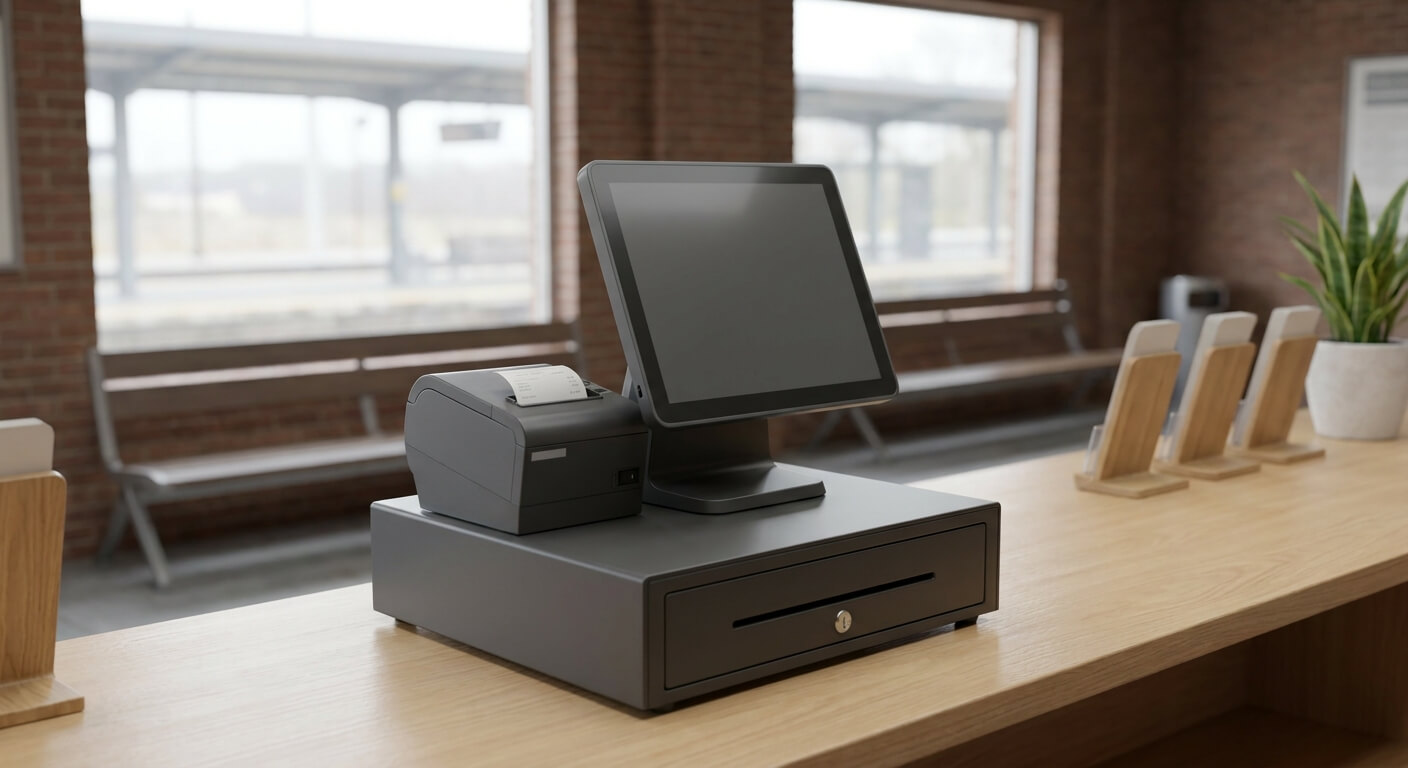
    A fixed bus ticket POS machine suits a staffed counter or a depot. It sits in one place, usually with a larger screen, a receipt printer, and a cash drawer. Agents get comfortable with it quickly, and it is easy to supervise.

    A handheld or tablet-based setup suits selling away from the counter. That might be at a curb, in a parking lot, or on the platform while a line forms. It lets an agent move to the customers instead of the other way round.

    Many operators end up with both. The counter handles the steady flow and cash, while a mobile device handles the peak at departure time. The question is not which is better, it is which jobs your operation has and where each one happens.

    Whichever you choose, ask whether both connect to the same live inventory. A seat sold on a handheld at the curb should disappear from the counter screen at once. If two devices keep separate counts, you have recreated the overselling problem on your own platform.

    Think about the environment as well. A counter in a heated station has different needs from a curb in winter or a depot in summer. Ask how a bus ticket POS machine copes with glare, cold, dust, and a long shift, and whether the screen is easy to read for an agent who is standing.

    Power and space matter too. A fixed bus ticket POS machine needs room for a printer and a drawer, and a mobile one needs a charging routine. Small details like these decide whether agents like the equipment or work around it.

    bus-ticket-pos-machine-handheld

    Six Questions To Ask Before You Buy A Bus Ticket POS Machine

    These questions are meant for any vendor and should be answered in writing. Where UBT has not published a detail, we say so, and the right move is to ask the team directly instead of assuming.

    First, does the machine work with the ticketing system you plan to use, or is it a separate product? A device that does not connect to your inventory becomes a place where numbers are re-typed.

    Second, what happens when the connection drops? Counters and depots do not always have perfect internet. Ask what an agent can still do and how sales are reconciled once the connection returns.

    Third, who supplies and supports the hardware? UBT’s site does not state its hardware arrangements, so this is a question to raise early. Ask who replaces a failed printer or screen, and how long a counter can be without one.

    Fourth, how are staff accounts handled? Each agent should sign in under their own name so reports show who sold what. Ask about permissions for refunds, voids, and schedule changes.

    Fifth, what does the full cost look like? Ask about hardware, software, and support separately, and write down any figure with its conditions. Do not rely on a single headline number.

    Sixth, can you try it first? UBT states that there is no cost and no obligations if you do not like the service. A test on one route and one counter tells you more about a bus ticket POS machine than any specification sheet.

    How The Machine Fits Into The Rest Of Your Operation

    A bus ticket POS machine is only one channel. If you also sell online or through third party websites, the counter should see the same seats. UBT states that its shared APIs sync instantaneously across all sales channels, including third party websites.

    Our guide to selling across several channels without double-selling seats explains why that matters. The counter is often where a conflict is discovered, usually in front of a customer, which is the worst place to find it.

    The same point applies to schedule changes. UBT’s own example is that you can cancel a busline or move one an hour later due to mechanical issues. Whatever machine you choose, the agent should see the change on the screen straight away.

    It also helps to think about the people. Agents who are new to a system need time on the machine before the first busy day. Our article on training staff on a new ticketing system lists what to cover.

    Finally, think about the end of the day. The machine produces the records that reconcile against the cash in the drawer. Our checklist of five capabilities every bus POS needs is a good companion when you compare options side by side.

    A Short Checklist For Choosing A Bus Ticket POS Machine

    List the places you sell today and the places you want to sell. Decide whether each needs a fixed device or a mobile one. Confirm that every device sees the same live inventory.

    Ask what works offline, who supports the hardware, and how staff accounts are set up. Ask for costs in writing, with their conditions. Test one counter and one route before you commit the rest.

    A bus ticket POS machine should make the counter faster and the numbers clearer, not add another place to type. If you want to talk through your own counters and routes, request a walkthrough from United Bus Tech and bring your list of questions.

  • Free Ticketing System: 5 Essential Questions Before You Say Yes

    Free Ticketing System: 5 Essential Questions Before You Say Yes

    A free ticketing system sounds like the easy answer for a bus company watching its costs. The word free carries a lot of weight in a purchase decision, and it can mean five different things depending on who says it.

    Before an owner says yes, it helps to know which kind of free is actually on offer.

    This guide is written for the owner or operations manager of a bus company. It does not rank vendors or promise a price. It explains what a free ticketing system can reasonably mean, what to ask before you rely on one, and how to test any offer without putting live ticket sales at risk.

    Put plainly, a free ticketing system is only as useful as its terms. The goal of this article is to help you read those terms before you build a business process around them.

    The short version is simple. Free at the start is a good thing, and some of it is real. Free forever with nothing behind it is rare, and a business that depends on ticket revenue should always ask who is paying for the system and how.

    What A Free Ticketing System Can Actually Mean

    The first meaning is a free trial. You use the system for a limited period, nothing is charged, and you decide afterward whether to continue. This is the most common form and the easiest to verify, because it has a start date and an end date.

    The second meaning is no setup fee. The vendor does not charge to get you started, but there may be ongoing charges once you are live. That is a different thing from a free ticketing system, and the difference shows up on the first invoice.

    The third meaning is a free tier with limits. You can use part of the product at no cost, up to some ceiling on routes, sales, or users. These limits matter most to a growing company, because the ceiling is reached just when the business starts to work.

    The fourth meaning is a free system paid for somewhere else. The cost moves to a booking fee on each ticket, a share of revenue, or an add-on you need later. None of these is wrong, but each changes the real cost of selling a seat.

    The fifth meaning is a free tool that is not built for ticketing at all. A generic booking form or event page can take a reservation, but it was not designed for routes, departures, seat inventory, or a counter agent selling at the window.

    free-ticketing-system-planning-desk

    What UBT Says About Free And No Obligation

    UBT states on its site: “Free and no obligations at all! We provide Technology as a Service. If you do not like it, there will be no cost and obligations to you.” That is a statement about trying the service and walking away, which is the first meaning above.

    It is worth reading carefully, because it does not say the service is free forever. It says that if you do not like it, you owe nothing. The site does not state a trial length, so that is a question to settle with the team directly, in writing, before you start.

    A fair reading, then, is that a free ticketing system of this kind lowers the risk of the first step. It lets an operator test the product before paying anything. Our guide to testing a bus ticketing system through a free trial covers how to use that window well.

    Five Questions To Ask About Any Free Ticketing System

    These questions work for any vendor, including us. They are meant to be asked in a call or an email and answered in writing. If an answer is vague, treat that as information.

    First, what exactly is free, and for how long? Ask for the start and end of the free period, and what happens on the day it ends. A clear answer should say whether anything is charged automatically.

    Second, what is the cost after the free part? Ask how the system is charged once you are live, and whether that depends on tickets sold, routes, users, or a flat amount. Any figure you are given should be written down with its conditions.

    Third, what limits apply? A free ticketing system with a cap on routes or sales may be fine for a pilot and a problem for a full season. Ask where the ceiling is and what the next step costs.

    Fourth, what happens to your data if you leave? You should be able to take your routes, schedules, and records with you. Ask how that works before you enter any of it, not after.

    Fifth, who supports you while it is free? Free access with no help at the moment of a live problem is not the same as a managed service. Ask who answers when a counter agent cannot sell a ticket.

    free-ticketing-system-trial-box

    How To Test A Free Ticketing System Without Risk

    The safest way to use a free ticketing system is to keep it away from your live sales at first. Build one route, or a copy of one, and run it in parallel with what you do today. Nothing is lost if the answer is no.

    Pick the jobs that hurt most. If overselling is your problem, test inventory first. If schedule changes cause chaos, change a departure and watch what happens. UBT says a busline can be cancelled or moved an hour later due to mechanical issues, so that is an easy test to run.

    If you sell on more than one channel, test that too. UBT states that its shared APIs sync instantaneously across all sales channels, including third party websites. Sell a seat in one place and confirm the others update, rather than taking anyone’s word for it.

    Let the people who will use it try it. Counter agents and dispatchers find problems an owner never sees. Our article on training staff on a new ticketing system lists what new hires usually need to learn.

    A free ticketing system that passes these tests has earned a longer look. One that fails any of them has still taught you something, at no cost, about what to ask the next vendor.

    Write down what you decided and why. A short note with the date, the route you tested, and the result gives you something to compare against when the free period ends. It also keeps the decision about the product, not about the price.

    When A Free Ticketing System Is The Right First Step

    A free ticketing system makes the most sense when the real obstacle is uncertainty. If a company has never used a dedicated system, or has been burned by one before, a no-cost first step lets the team learn with little at stake.

    It is less useful when the question is already about the long term. If you are comparing vendors on contract terms, support, and total cost, the free part is a small piece of the picture. Our bus ticketing software contract checklist covers the terms worth reading.

    It also helps to connect the offer to the cost of waiting. Every month on spreadsheets or manual sales has a price, even if no invoice arrives. If an owner can test a system at no cost, the cost of not testing is the one that remains.

    One more point is worth making. A system built for operators, rather than for generic bookings, tends to ask the right questions early. Our piece on a bus ticketing system with no setup fee looks at how that protects a budget.

    A Short Checklist Before You Say Yes To A Free Ticketing System

    Confirm in writing what is free and for how long. Confirm what is charged afterward and under what conditions. Confirm any limits on routes, sales, or users, and confirm how you can take your data with you.

    Test one route and one schedule change before anything live depends on it. Have a counter agent and a dispatcher try it. Check that every sales channel you use stays in sync.

    Decide who owns the decision and by what date. A trial with no deadline tends to drift, and a drifting trial is a free ticketing system that quietly becomes a habit.

    If you want to see how this works for your own routes, request a walkthrough from United Bus Tech and bring your list of questions with you.

  • How Does Bus Ticketing Software Work: 6 Simple Steps From Sale To Report

    How Does Bus Ticketing Software Work: 6 Simple Steps From Sale To Report

    If you are asking how does bus ticketing software work, you are probably running a small operation and deciding whether a system is worth the trouble. The honest answer is simpler than the vendor pages make it sound.

    It is one record of your seats and schedules that every sale, every boarding check, and every report reads from.

    That single shared record is the whole idea. Without it, the counter has one list, the website has another, and someone reconciles them at the end of the day. With it, a seat sold anywhere is sold everywhere.

    This guide explains how bus ticketing software works from the first sale to the last report, in plain operator terms. It uses the four capabilities UBT lists for its platform: point-of-sale, ticket validation, inventory control, and real-time reporting.

    How Does Bus Ticketing Software Work At The Core

    Think of the system as a ledger of departures. Each departure has a route, a time, and a number of seats. Every time a seat is sold, held, cancelled, or boarded, the ledger changes, and everything else in the system looks at that ledger.

    That is why inventory control sits at the center. UBT lists it alongside point-of-sale, ticket validation, and real-time reporting, and the other three depend on it. A sale reduces available seats, a validation confirms a seat was used, and a report summarizes what the ledger says.

    When people ask how bus ticketing software works, they often imagine a website with a booking form. The website is only one front door. The real work happens behind it, where the system decides whether a seat is still available and records who holds it.

    how-does-bus-ticketing-software-work-dispatch-office

    Step By Step: How Bus Ticketing Software Works From Sale To Report

    Step one is the sale. A customer buys a seat at the counter, online, or through a partner, and the system confirms the seat is free before it accepts the order. This is the point-of-sale part of the platform, and it is where most day-to-day activity begins.

    Step two is the hold on inventory. The moment the sale is confirmed, the seat is removed from availability. Any other channel looking at that departure now sees one fewer seat, which is what prevents two people from buying the same one.

    Step three is the ticket itself. The customer receives something they can present, and the system keeps the matching record. UBT describes flexible ticketing validation options to meet your needs, so the check at boarding can fit how a company actually operates.

    Step four is validation at boarding. A driver or boarding agent checks the ticket against the record. The system marks the seat as used, so a copied or repeated ticket can be spotted instead of quietly accepted.

    Step five is the schedule change, which is where a good system earns its keep. UBT’s own example is cancelling a busline or moving it an hour later due to mechanical issues. Because everything reads from one ledger, the change reaches every channel together.

    Step six is reporting. UBT lists real-time reporting as one of its four core capabilities. Reports are simply views of the same ledger, so the numbers a manager sees reflect what has actually been sold and boarded rather than yesterday’s export.

    Put together, these six steps are the full answer to how does bus ticketing software work. Nothing in the chain is exotic. The value comes from every step using the same record instead of passing information between separate tools.

    How Bus Ticketing Software Works Across Several Sales Channels

    Most small operators sell in more than one place. There might be a counter, a website, and a third-party seller. Each one is a channel, and each one used to mean another list to keep in step.

    UBT states that it allows shared APIs that sync instantaneously across all sales channels, including third party websites. In practice that means a sale in one place updates the seat count for every other place without anyone typing it in twice.

    This is also how bus ticketing software works to prevent overselling. The system does not rely on people noticing a conflict. It checks the shared record at the moment of sale, so the second buyer simply sees that the seat is gone.

    If overselling is your main worry, our guide on how to stop overselling bus seats goes deeper into the causes. For a wider look at selling in several places, see our piece on multi channel bus ticket sales.

    how-does-bus-ticketing-software-work-sales-channels

    What Else Bus Ticketing Software Can Do Around The Sale

    Once the core ledger exists, other tools can sit on top of it. UBT lists real time fleet tracking for passengers and management, so both the office and the traveler can see where a bus is.

    It also lists automated SMS boarding reminders, ETA tracking, and onboard movie streaming over mobile devices as part of its passenger experience. These are extras around the core, and a small operator does not need all of them on day one.

    A loyalty and reward program is another layer. UBT describes it as a way to encourage repeat purchases and retain customers by rewarding existing passengers. Again, it reads from the same record of who bought what.

    The useful way to think about these is as optional rooms in a house whose foundation is the ledger. Start with sales, validation, inventory, and reports. Add the rest only when a real problem calls for it.

    Common Misunderstandings About How Bus Ticketing Software Works

    The first misunderstanding is that bus ticketing software is mainly a website. The website is useful, but a counter sale, a boarding check, and a schedule change all rely on the same system. A company that only sees the booking page misses most of what is going on.

    The second is that the software needs a large team. The steps above are ordinary tasks that counter agents and dispatchers already do. The system changes where the information lives, not who is responsible for it.

    The third is that adopting a system means abandoning your current way of working overnight. Operators can start with one route or one counter and widen the use from there. Our bus route launch checklist shows how to bring a route online in an orderly way.

    Understanding how bus ticketing software works makes every demo easier to follow. When a vendor shows a screen, you can ask which part of the ledger it reads or changes. That one question cuts through most of the jargon.

    How To Decide Whether You Need It

    A small company with a handful of departures can run on paper and a spreadsheet for a while. The trouble starts when sales come from more than one place, when schedules change often, or when nobody has time to reconcile the numbers.

    If any of those sound familiar, the next step is to define what you actually need. Our bus ticketing system requirements checklist helps you separate must-haves from nice-to-haves before you talk to any vendor.

    For a company that is small but growing, our article on bus ticketing software for small operators covers what changes with fleet size. It is a good companion to this explanation of how bus ticketing software works.

    When you are ready to see it working, UBT’s free option comes with no cost and obligations if you do not like it. That makes it easy to look at real screens with your own routes in mind and decide for yourself.

    To see how bus ticketing software works with your own schedule, request a walkthrough from United Bus Tech and ask to see a sale travel from the counter to the report.

  • Bus Ticketing Software Pilot Program: 7 Essential Checks Before You Commit

    Bus Ticketing Software Pilot Program: 7 Essential Checks Before You Commit

    A bus ticketing software pilot program is the stretch of time when a new system runs against real routes before the whole company depends on it. Most operators treat it as a demo with more screens. It works better as a test with a pass or fail answer written down in advance.

    The owner of a bus company usually has one real fear at this stage: committing to a system that looks fine in a sales call and then falls apart on a busy Friday. A well-run pilot program is how that fear gets answered with evidence instead of a feeling.

    This guide is an acceptance checklist for a bus ticketing software pilot program. It covers what to verify, how to run the test without disrupting sales, and how to decide at the end.

    It deliberately says nothing about how long a trial lasts, because that is something to confirm with the vendor directly.

    What A Bus Ticketing Software Pilot Program Is Really For

    A pilot program answers one question: will this system run our operation the way we actually run it. That is different from asking whether the software has the features on a list. Features are easy to show. Fit is only visible when your own routes, staff, and sales channels are involved.

    UBT describes its free option plainly: free and no obligations at all, delivered as Technology as a Service, and if you do not like it there will be no cost and obligations to you. That framing matters because it means a pilot program can be a genuine test rather than a purchase in disguise.

    Our guide to testing a bus ticketing system through a free trial explains why that low-commitment start changes how a company should approach the evaluation. The short version is that you can afford to be strict about what counts as a pass.

    A bus ticketing software pilot program also protects the people who will use the system every day. Counter agents, dispatchers, and managers each touch a different part of it. If only the owner sees the system during a trial, the people who will live with it are never asked.

    bus-ticketing-software-pilot-program-checklist-desk

    7 Essential Checks For A Bus Ticketing Software Pilot Program

    Write each of the checks below on one page before the pilot begins, with a plain pass or fail next to it. If a check cannot be failed, it is not a real test.

    The seven checks follow the four capabilities UBT lists for its platform, plus three situations that cause trouble in daily operations.

    Check one is point-of-sale. Sell a ticket at the counter from start to finish, including a correction after the sale. The test is whether an agent who has never seen the system can complete a sale without asking for help more than once.

    Check two is ticket validation. UBT describes flexible ticketing validation options to meet your needs, so the pilot should use the validation method your drivers or boarding staff would actually use.

    Test a valid ticket, a ticket for the wrong departure, and a ticket that has already been used.

    Check three is inventory control. Pick one departure and sell it from more than one place. The seat count should stay correct everywhere without anyone adjusting it by hand.

    Our piece on managing seat inventory across online and counter sales explains why this is where manual systems fail first.

    Check four is real-time reporting. After a few test sales, open the reports and compare them with what you know happened. Reporting that lags behind the counter is hard to trust, and a manager who cannot trust the numbers will keep a spreadsheet on the side.

    Check five is channel sync. UBT states that it allows shared APIs that sync instantaneously across all sales channels, including third party websites. In a pilot, sell a seat through one channel and confirm it disappears from every other channel immediately.

    Check six is schedule changes. UBT’s own wording is that you can cancel a busline or move it an hour later due to mechanical issues. Simulate that exact case during the pilot and see what a dispatcher has to do, and how many steps it takes.

    Check seven is staff handling. Let two people who are not the owner run the system for a normal shift. Note every question they ask and every place they get stuck. That list is more valuable than any feature comparison, because it predicts what the first month will feel like.

    bus-ticketing-software-pilot-program-ticket-counter

    How To Run A Pilot Program Without Disrupting Sales

    The safest design for a bus ticketing software pilot program is a narrow one. Choose a single route, or a single counter, and keep everything else on the current process. That limits the damage if something goes wrong and keeps the comparison clean.

    Run the old and new process side by side for the pilot route where possible. Every sale happens in both places, and at the end you compare the two. Differences point to either a setup mistake or a real gap, and both are worth knowing about before a full rollout.

    Decide who owns the pilot before it starts. One person should collect the pass or fail results, log every problem, and talk to the vendor. When ownership is shared between three people, issues get mentioned in the hallway and never recorded.

    Keep a simple problem log with three columns: what happened, who noticed, and whether it blocks a sale. A problem that blocks a sale is a serious finding. A problem that is only annoying is still worth writing down, but it should not carry the same weight in the final decision.

    Agree in advance on what the vendor must answer during the pilot. Support responsiveness is part of the product. If a question about a schedule change takes a long time to get answered during a low-stakes test, that is useful information about what a high-stakes day would look like.

    A pilot program is also the right time to ask the questions that never fit into a demo. Our list of questions to ask in a bus ticketing software demo is a good starting point, and many of them are easier to answer once you have real sales running through the system.

    What To Leave Out Of A Bus Ticketing Software Pilot Program

    Do not try to test everything at once. A pilot that covers every route, every channel, and every report becomes a full migration with none of the planning. If it fails, nobody can tell which part caused the failure.

    Do not judge a bus ticketing software pilot program on speed alone. A system that feels fast on a quiet afternoon says little about a busy departure window. Focus on whether the results are correct and whether staff can recover from a mistake.

    Do not let the pilot depend on one enthusiastic person. If the only reason the test went well is that one employee stayed late to make it work, the result will not hold up once the system is in daily use.

    Finally, do not treat missing information as a pass. If you could not test a capability during the pilot, write that down as unverified. A list of unverified items is a useful agenda for the final conversation with the vendor.

    Making The Decision After The Pilot Program

    At the end of the pilot, count the checks. Each of the seven should have a result, a note, and an owner. If four or five clearly pass and the rest are unverified, you have a clear next step. If two or three clearly fail, you have an equally clear answer.

    Weigh the failures by how much they would hurt on a busy day, not by how often they came up. One failed inventory check can matter more than five minor interface complaints, because overselling a seat costs real money and goodwill.

    If the decision is to move forward, the next step is the contract and the cutover. Our bus ticketing software contract checklist and our guide to switching bus ticketing systems cover those stages in order.

    If you wrote your requirements down before the pilot, use them now. Our bus ticketing system requirements checklist shows how to turn a vague wish list into a short list of must-haves that a pilot can actually test.

    A good bus ticketing software pilot program ends with a decision you can explain to a partner, a lender, or a staff member in two minutes. If the reasoning needs a long speech, the pilot was probably too broad.

    If you would like to run your own bus ticketing software pilot program, request a walkthrough from United Bus Tech and bring your acceptance checklist with you.

  • Bus Ticketing System Requirements Checklist: 7 Essential Areas to Audit

    Bus Ticketing System Requirements Checklist: 7 Essential Areas to Audit

    Most bus companies start comparing ticketing software with a demo invitation and a vague sense that the current process is too slow. A written bus ticketing system requirements checklist changes that conversation before it begins.

    This article is for owners and operations managers who are about to ask vendors for a proposal. It gives you seven areas to audit in your own operation, so you can decide what is required, what is nice to have, and what you can ignore.

    bus-ticketing-system-requirements-checklist-notebook

    Why a Bus Ticketing System Requirements Checklist Comes Before Any Demo

    Vendors are good at showing what their product does. They are not responsible for knowing what your operation needs, and a demo without a list of requirements tends to drift toward the features that look best on screen.

    A bus ticketing system requirements checklist reverses that. You arrive with questions rooted in your own routes, your own counters and your own pain points, and the vendor answers them, rather than the other way around.

    It also keeps the buying team aligned. Dispatch, finance, counter staff and ownership rarely want the same thing, and putting it on paper early surfaces disagreements while they are still cheap to resolve.

    If you are already at the comparison stage, the guide on how to choose a bus ticketing system covers evaluation once your list exists.

    Separate must-haves from nice-to-haves

    Mark each line on your list as required, useful or optional. Required means you cannot run a normal day without it. Useful means it saves effort. Optional means you would only use it occasionally.

    This single step prevents the most common buying mistake, which is paying for breadth you never use while a required capability turns out to be missing.

    Map Your Current Operation First

    You cannot write requirements for a business you have not described. Start by noting how a ticket actually moves today, from the moment a passenger asks for a seat to the moment they board.

    Write down where tickets are sold: the counter, the phone, a website, partner sites. Write down who changes schedules and how passengers find out. Write down where the numbers come from at the end of the week.

    Gaps in this map become the first items on your bus ticketing system requirements checklist. A process that relies on one person’s memory, for example, points to a requirement for shared and visible records.

    The 7 Areas Every Bus Ticketing System Requirements Checklist Should Cover

    The areas below are a starting structure rather than a fixed rule. Every operation will weight them differently, so adjust the list to your routes and your team.

    1. Sales at the counter

    If you sell at a window or a station desk, you need a point of sale that staff can learn quickly. Ask what a counter sale involves, and what happens when something needs to be corrected.

    UBT describes a platform that combines Point-of-Sale, Ticket Validation, Inventory Control and Real-time Reporting. That combination is a helpful reference when you decide whether you want these functions together or separate.

    The piece on a bus POS checklist goes through counter requirements in more detail.

    2. Online and partner channels

    List every place you want to sell. Then write the requirement that matters most for multiple channels: all of them must show the same seat availability, in real time.

    UBT states that its shared APIs sync instantaneously across all sales channels, including third party websites. Whether you use that or another system, put the question on your list in exactly those terms.

    bus-ticketing-system-requirements-operations-office

    3. Inventory and seat control

    Decide how seats are counted and who is allowed to change the count. Ask what happens when a trip is moved or cancelled after tickets have been sold.

    This is also where you describe the situations you have actually faced: a bus swapped for a smaller one, a departure merged with another, or a last-minute stop added.

    4. Schedule changes

    Operations rarely run exactly to plan, so your requirement should describe how a change is made and how quickly. UBT’s own description gives a concrete scenario: moving a departure an hour later because of a mechanical issue.

    Ask each vendor to show that exact case live, from the operator’s side. Then ask what the passenger sees afterward.

    5. Ticket validation

    Boarding is where the system meets the real world. Write down who checks tickets, on what kind of device, and how many passengers they need to process in a busy departure window.

    UBT mentions flexible ticketing validation options. For your list, turn that idea into a specific question about how validation would work for your drivers and station staff.

    The article on bus ticket validation options helps you frame the choices.

    6. Reporting

    Decide which questions you need answered each week: which trips filled, where sales were soft, which channels performed. Then require that the system can answer them without an export and a spreadsheet.

    UBT lists real-time reporting as part of its core capability. Use that as a prompt, but write your own list of the reports you would open every Monday.

    7. Passenger communication and retention

    Passengers want to know when something changes. Include a requirement for how they are informed, such as automated SMS boarding reminders and ETA tracking, which UBT describes as part of its passenger experience.

    If repeat riders matter to your business, add loyalty to the list. UBT describes a Loyalty and Reward Program aimed at retaining customers by rewarding existing passengers.

    Turning Your Bus Ticketing System Requirements Checklist Into Questions

    A list of needs is only useful once it becomes questions. Convert each line into a request to see something working, rather than a yes-or-no question about whether a feature exists.

    For example, instead of asking whether a system supports schedule changes, ask the vendor to move a departure an hour later and show how the ticket holders and the seat count are affected.

    The same idea shapes the questions to ask in a bus ticketing software demo, which pairs well with your checklist.

    Add commercial terms to the list

    Requirements are not only technical. Add a short section for the terms you want to understand: how pricing works, what setup involves, and what happens if you decide to leave.

    The bus ticketing software contract checklist covers the agreement side, and the list of requirements you build here should feed straight into it.

    Score, Compare and Decide

    Once you have answers, score each option against your list. A simple approach is to weight required lines more heavily than useful ones and ignore the optional ones until a tie needs breaking.

    Keep the scoring honest by writing notes beside each score while the demo is fresh. Two weeks later you will not remember which vendor showed what.

    Do not skip the test on your own routes. UBT provides its platform as Technology as a Service and says plainly that if you do not like it, there will be no cost and no obligations, which makes a trial run against your list a low-risk step.

    Put Your Checklist to Work

    A well-built bus ticketing system requirements checklist does three jobs: it clarifies what you need, it shapes every demo, and it gives you a fair way to compare answers. The work is mostly thinking about your own operation, not about software.

    Ready to test your list against a real platform? Request a free trial of UBT’s bus ticketing platform and see how each requirement holds up on your own routes.

  • How to Sell Bus Tickets Online: 5 Essential Steps for Operators

    How to Sell Bus Tickets Online: 5 Essential Steps for Operators

    Most bus companies start with phone calls and a counter, then reach the point where riders ask for something simpler. Knowing how to sell bus tickets online is less about technology and more about putting your operation in the right order first.

    This guide is written for owners and operations managers who want to move from zero to a working online sales channel. It walks through the decisions in sequence, so nothing gets built on top of a gap you discovered too late.

    how-to-sell-bus-tickets-online-laptop-desk

    How to Sell Bus Tickets Online: Start With Your Product, Not the Website

    Before choosing any tool, write down what exactly you are selling. The answer is usually a list of routes, each with departure points, stops and a schedule pattern.

    A common mistake is to treat the website as the starting point. In practice, the website only displays decisions you have already made about routes, departure times and seat counts.

    If your schedule lives in a spreadsheet, a driver’s notebook or one dispatcher’s memory, fix that first. The shortest path to how to sell bus tickets online is a clean, single source of truth for every trip.

    For a new route, the bus route launch checklist covers the operational groundwork that should be settled before the first seat goes on sale.

    Decide what a seat means

    This small definition saves a great deal of confusion later, so settle it with your dispatchers and counter staff together.

    A seat is the thing you are selling, so define it. Is it one fixed seat number, or simply one place on the bus? Does a return trip count as a separate seat, or a single booking?

    These answers shape how inventory is counted later. Operators who skip this step usually discover the problem when two channels sell the same last seat.

    Choose the Channels You Will Actually Run

    Learning how to sell bus tickets online does not mean building only one website. Most operators end up with several channels running together: a booking page, a counter or point of sale, and sometimes partner or third-party sites.

    The more channels you add, the more one rule matters: every channel must draw from the same seat count. A second copy of the inventory is how overselling starts.

    UBT describes its approach plainly: shared APIs that sync instantaneously across all sales channels, including third party websites. Whatever system you evaluate, ask the same question about how each channel stays in step with the others.

    If you already sell through more than one channel, the article on multi-channel bus ticket sales goes deeper on keeping counts consistent.

    Put differently, how to sell bus tickets online is really a question about one shared seat count. Get that right and the rest of the work becomes routine.

    Keep the counter in the same system

    It is tempting to keep the counter separate because it is familiar. The trouble is that counter sales then become the blind spot in your inventory.

    Point-of-sale, ticket validation, inventory control and real-time reporting belong together. When they share one system, a ticket sold at the window is visible everywhere else immediately.

    sell-bus-tickets-online-station-kiosk

    Set Up the Basics Before You Go Live

    With routes and channels decided, the practical side of how to sell bus tickets online is a short list of steps. Work through them in order, because each one depends on the one before.

    • Enter each route with its stops and departure pattern
    • Set the number of seats available on each trip
    • Decide your rules for changes, cancellations and refunds
    • Choose how tickets will be checked when passengers board
    • Agree who on your team can see and change what

    Policy matters more than people expect when you sell bus tickets online. Write your change and refund rules in plain language before launch, because customers will read them at the moment they buy.

    The walkthrough on handling refunds and reschedules is a useful reference for turning those rules into a repeatable process.

    Plan how tickets are checked

    An online ticket only has value if it can be verified at the door of the bus. Decide early whether drivers, station staff or both will do the checking, and on what device.

    UBT lists flexible ticketing validation options, which is worth remembering when you compare tools. The right option is the one your drivers can use in a real boarding line without slowing it down.

    Test the Whole Journey Like a Customer

    Before announcing anything, and before you tell a single rider that tickets are available, run several test bookings yourself from start to finish. Pick a route, choose a date, buy a seat, and then try to change it.

    Ask a colleague who did not help build the setup to try the same thing without instructions. Every place they hesitate is a place a real customer will abandon the purchase.

    Also test the unhappy paths. Cancel a trip, move a departure later, and check that the seat count and the customer-facing schedule both reflect the change.

    UBT describes the ability to cancel a busline or move it later, for example when a bus has a mechanical issue. Whatever you choose, confirm that a schedule change is something your team can do in minutes rather than a project.

    Train Your Team and Start Small

    Even the best plan for how to sell bus tickets online still fails if the people using it are unsure. Give counter staff and dispatchers time with the system before launch, and let them practice on test trips.

    For ideas on structuring that preparation, see training bus staff on a ticketing system.

    Launching on one route first is a sensible way to learn how to sell bus tickets online without risking the whole network. You will find gaps in your process on a small scale, where fixing them is cheap, instead of across the whole network.

    Decide in advance what you will look at after the first week. Real-time reporting helps here, because you can see which trips filled and where sales lagged while there is still time to react.

    Measure, Adjust and Expand

    The final piece of how to sell bus tickets online is the feedback loop. A channel that nobody reviews slowly drifts away from how your riders actually behave.

    Once your first route is live, the lesson of how to sell bus tickets online shifts to reading results. Treat the data as feedback rather than a scoreboard. Look at which departures sell early, which stay quiet, and which channel riders prefer.

    Expand one route at a time, applying what you learned. Each addition is easier than the last, because the routine of entering a route, setting inventory and checking tickets is already familiar.

    As sales grow, keep one habit: review your change and refund rules every few months. Real operations produce edge cases, and a short rule refresh keeps customers and staff aligned.

    Choosing a System to Run It On

    Any plan for how to sell bus tickets online needs a platform that handles inventory, point-of-sale, validation and reporting together.

    If you are still comparing options, how to choose a bus ticketing system lays out the evaluation criteria.

    It also helps to try a system on your own routes before committing. UBT provides its platform as Technology as a Service and says plainly that if you do not like it, there will be no cost and no obligations.

    Start Selling Online With Your Own Routes

    Working out how to sell bus tickets online is easier when you test it on real data. Put one route through the steps above and see where your process is strong and where it needs work.

    Ready to try it? Request a free trial of UBT’s bus ticketing platform and set up your first route with the system that keeps every channel in step.

  • Questions to Ask in a Bus Ticketing Software Demo: 7 Essential Checks

    Questions to Ask in a Bus Ticketing Software Demo: 7 Essential Checks

    A software demo is the one hour in the buying process when a vendor controls the screen. The questions to ask in a bus ticketing software demo are how an operator takes some of that control back, by asking to see real workflows instead of a polished tour of menus.

    This guide gives operators and operations managers a demo checklist built around what actually matters when selling tickets for a bus company. Each question maps to a capability that UBT lists on its site, so the same list works as a yardstick for any platform you look at.

    questions-to-ask-in-a-bus-ticketing-software-demo-laptop

    Why the Questions to Ask in a Bus Ticketing Software Demo Matter More Than the Slides

    Most demos follow a script: a login, a dashboard, a booking flow that works perfectly because it was rehearsed. That script shows what the software can do on its best day, not what it does when a departure is full and a counter agent is under pressure.

    The best questions to ask in a bus ticketing software demo break the script. They ask the presenter to move a departure, to sell the last seat from two places, to validate a ticket with the screen turned toward the room.

    A useful rule is to bring your three worst operating moments to the call and ask the vendor to walk through each one live. If the software handles them, the rest of the demo is a bonus. If it does not, the best-looking dashboard will not make up for it.

    Before the Call: Prepare Your Own Demo Script

    Preparing the questions to ask in a bus ticketing software demo starts with one request: run the demo with your routes, not sample data. Write down how you sell tickets today, which channels you use, and where things go wrong, then share that with the vendor beforehand.

    Invite the people who will use the system every day. Counter staff, dispatchers and whoever handles refunds notice things an owner will not, such as an extra click on a screen used two hundred times a shift.

    If you are still deciding what to measure at a higher level, how to choose a bus ticketing system covers the evaluation dimensions this checklist builds on.

    7 Questions to Ask in a Bus Ticketing Software Demo

    The seven questions below follow the capabilities UBT groups together as “Point-of-Sale, Ticket Validation, Inventory Control, and Real-time Reporting,” plus the channel sync and passenger-facing tools that surround them.

    1. Can You Sell a Ticket at the Counter Right Now?

    Ask the presenter to sell a ticket through the point-of-sale screen while you watch, then count the clicks and the time. Staff will run this flow all day, so speed and clarity matter more than any feature list.

    Then ask what happens when the customer changes their mind mid-sale. A sale that cannot be corrected gracefully causes trouble at the window.

    The checklist for this part of the evaluation is expanded in a bus POS checklist for operators.

    2. How Are Tickets Validated at Boarding?

    UBT describes “Flexible ticketing validation options to meet your needs,” which is a useful phrase to test against. Ask which validation methods the platform supports, and ask to see one used end to end, from the ticket a passenger holds to the moment it is checked.

    Also ask what a driver or boarding agent does when validation fails. The answer shows how the system treats the awkward cases.

    3. How Does Inventory Control Work Across Every Channel?

    This is the question that separates platforms most sharply. Ask the presenter to sell the last seat on a departure from one channel, then try to sell it from another.

    UBT states that its shared APIs “sync instantaneously across all sales channels, including third party websites.” A demo should let you see that idea working in practice rather than accept it as a claim.

    4. What Happens When a Departure Changes?

    Ask to move a departure an hour later and watch what changes for existing ticket holders. UBT’s own wording for this scenario is “Need to move it an hour later due to mechanical issues? No problem, UBT allows you to move your schedule around.”

    Follow up by asking how passengers are told. The notification side of a schedule change is often where the workflow stops, and it is the part operators feel first.

    5. What Do the Real-Time Reports Actually Show?

    Reporting is easy to demonstrate with clean data and hard to judge. Ask which reports you would use on a normal day, and ask for them to be run against something that resembles your operation.

    Ask whether the numbers update as sales happen or after the fact. UBT lists real-time reporting alongside POS, validation and inventory, so this is worth pressing on. A short read on the reporting side is in real-time bus reporting for operators.

    bus-ticketing-software-demo-questions-meeting-room

    6. What Can Passengers See and Receive?

    Among the questions to ask in a bus ticketing software demo, the passenger-facing tools shape how many calls reach your counter. UBT describes automated SMS boarding reminders, ETA tracking and real time fleet tracking for passengers and management.

    Ask to see these from the passenger side, not only the operator side. A feature that looks good on an admin screen may be invisible or confusing to the person it is meant to help.

    7. What Do Contract and Support Terms Look Like?

    The last question moves from software to relationship. Ask how onboarding works, who answers when something breaks on a busy day, and what it takes to leave. These answers are best gathered before you sign, and a bus ticketing software contract checklist lists what to confirm.

    Red Flags to Watch for During the Demo

    A few patterns should slow you down. If the presenter avoids live actions and only shows screenshots, ask again for a live flow. If a question is answered with “that is on the roadmap,” write it down and treat the feature as missing until it ships.

    When reviewing the questions to ask in a bus ticketing software demo afterward, be equally alert to vague answers about sales channels. Inventory that does not stay in sync across channels is the root of overselling, and no dashboard fixes it after the fact.

    Finally, notice whether the vendor asks about your operation. A presenter who never asks how you sell tickets today is probably running the same script for every buyer.

    Turn the Demo Notes Into a Decision

    Score each of the questions to ask in a bus ticketing software demo right after the call, while the answers are fresh. A simple pass, partial or fail for each is enough, along with a note on who in your team will feel the difference most.

    Compare the scores across the platforms you see, and let the failures guide the decision more than the highlights. A single failed live workflow on your worst operating moment tells you more than an hour of smooth screens.

    Skip the Guesswork With a Free Trial

    A demo shows the software in the vendor’s hands. A trial shows it in yours. UBT provides its ticketing platform as Technology as a Service, and the site is direct about the terms: “Free and no obligations at all! …

    If you do not like it, there will be no cost and obligations to you.”

    Ready to run your own questions to ask in a bus ticketing software demo against a real system? Request a free trial of UBT’s bus ticketing platform and bring your worst operating moment with you.

  • Cloud Based Bus Ticketing System: 5 Practical Questions Before You Switch

    Cloud Based Bus Ticketing System: 5 Practical Questions Before You Switch

    A cloud based bus ticketing system moves the software off a back-office computer and onto servers an operator never has to touch. That sounds simple, but it changes how a handful of daily problems get solved, not just where the code happens to run.

    Before switching, it helps to know what actually changes and what questions are worth asking a vendor, cloud based or not.

    cloud-based-bus-ticketing-system-office-monitor

    What Changes With a Cloud Based Bus Ticketing System

    With a locally installed system, every sales channel updates on its own schedule, and someone has to reconcile them by hand. A cloud based bus ticketing system removes that reconciliation step entirely.

    Shared APIs sync instantaneously across all sales channels, including third-party websites, so a seat sold at the counter disappears from the app in the same moment. There is no overnight batch job catching up on yesterday’s sales.

    It also changes the cost conversation. UBT offers its platform as Technology as a Service, free and with no obligations at all — if it does not fit an operation, there is no cost or obligation either way.

    That model is explored further in what a ticketing system with no setup fee actually includes.

    Cloud Based Bus Ticketing System Questions Worth Asking First

    Not every product calling itself cloud based delivers the same thing. Five questions separate a real answer from a marketing label.

    1. Does Every Channel Update in Real Time, or Just Refresh Periodically?

    Some systems poll for updates every few minutes rather than syncing instantly. That gap is exactly where overselling happens, and it defeats the point of moving to the cloud in the first place.

    What a properly synced setup looks like end to end is covered in what a unified ticketing system needs to do.

    2. What Happens at the Counter if the Internet Drops?

    Every counter depends on a connection at some point. Ask what the fallback looks like during an outage, whether that means a queued sale or a system that simply stops taking payment.

    3. Does “Cloud” Still Mean a Large Upfront Setup Cost?

    Cloud hosting alone does not guarantee a low-friction rollout. Some vendors still bill significant setup and integration fees before an operator sees a single ticket sold through the new system.

    4. How Does Existing Ticket and Passenger Data Move Over?

    Loyalty history, passenger records, and open bookings should not have to start from zero on cutover day. Ask exactly what migrates automatically and what has to be rebuilt by hand.

    How that plays into keeping repeat riders engaged is covered in the context of account based ticketing for repeat passengers.

    cloud-based-bus-ticketing-system-dashboard-tablet

    5. How Do I Know the System Is Actually Working After Go-Live?

    Real-time reporting is only useful if someone reviews it and it matches what is actually happening at the counter and on the road. A regular check against those numbers catches problems early instead of three weeks later.

    A practical framework for that ongoing check is laid out in running a bus technology audit.

    What a Cloud Based Bus Ticketing System Should Not Require

    It is just as useful to know what a cloud based bus ticketing system should not demand from an operator, since some of the friction operators expect turns out to be avoidable.

    It should not require a long-term contract signed before anyone on staff has actually used the system. A free trial with no obligations lets counter staff, dispatchers, and drivers test it against a real week before anyone commits to anything.

    It should not require choosing between passenger-facing features and management features. Real time fleet tracking, for example, is built for passengers and management together, not as two separate add-ons sold at two separate prices.

    It should not require a dedicated IT hire just to keep it running. Technology as a Service means the vendor carries that maintenance load, which matters most for smaller operators who do not have a technology team to spare.

    And it should not require guessing whether a feature works as described. Flexible ticket validation options and shared APIs across sales channels are the kind of claims worth testing directly during a trial period, not taking on faith from a sales page.

    What to Verify Before Committing to a Cloud Based Bus Ticketing System

    Answering the five questions above from a sales page is not the same as testing them. A short list of direct checks separates a real answer from a marketing claim.

    Sell a ticket on one channel and confirm it disappears from every other channel within moments, not on the next refresh. Shared APIs are supposed to sync instantaneously across all sales channels, including third-party websites, so this should be visible immediately during a trial.

    Read the free trial terms directly rather than taking “no obligation” as a given. UBT states it plainly: free and no obligations at all, with no cost if it does not fit. Confirm that is actually how the agreement reads before assuming it.

    Run flexible ticket validation against an operator’s actual routes, not a generic demo route, since the right validation method for a busy urban stop is not always the right one for a rural one.

    Pull a real-time report after an actual shift and compare it against what the counter and drivers experienced that day. Numbers that do not match what staff saw firsthand are a sign the reporting is not yet trustworthy.

    Ask directly whether anything locks an operator in once the trial ends. A cloud based bus ticketing system that genuinely has no obligations should let an operator walk away with no cost either way, not just during an initial evaluation window.

    Rolling Out a Cloud Based Bus Ticketing System Without Disrupting Sales

    Switching systems cold, with no overlap, is where most of the risk in a rollout comes from. A cloud based bus ticketing system with a genuine free trial makes it possible to avoid that entirely.

    Run the new system in parallel with the current one during the trial window instead of cutting over in one step. If something does not work as expected, nothing about current sales is put at risk while it gets sorted out.

    Bring counter staff in first, since they touch Point-of-Sale, ticket validation, and inventory control every day and will notice problems fastest. Bring dispatchers in next, since they depend on real-time inventory and fleet tracking once schedule changes start moving through the new system.

    Bring managers in last, once a full week of real-time reporting exists to review, rather than judging the system on a single day that may not be representative.

    Decide before go-live, not after, who is responsible for communicating a schedule change to ticket holders and who owns migrating loyalty and passenger data, so neither step gets assumed to already be handled.

    Testing a Cloud Based Bus Ticketing System Without Committing First

    The honest way to answer most of the five questions above is to run real routes through the system before signing anything long-term. A trial period that costs nothing if it does not fit removes the guesswork entirely.

    Want to see how a cloud based bus ticketing system handles your own channels and routes? Request a free trial of UBT’s platform and test it against a real week of sales.

  • Bus Ticketing Contract Checklist: 7 Essential Questions Before You Sign

    Bus Ticketing Contract Checklist: 7 Essential Questions Before You Sign

    By the time a bus ticketing contract checklist gets pulled out, most of the real decision is already made — the demo went well, the reporting looked right, and the team is ready to move forward. What is left is the paperwork, and that is exactly where B2B software deals quietly stall.

    A long buying process does not fail because a product was wrong. It fails because a contract term nobody asked about surfaces after signing — a lock-in period, a fee for exporting your own data, or a trial that turns out not to be as free as it sounded.

    None of the questions below require a lawyer to ask. They are the same questions worth bringing to any vendor conversation before a bus operator commits a season of ticket sales to a new system.

    They are organized the way a procurement conversation actually flows — starting with what happens if the trial does not work out, moving through cost and data ownership, and ending with who inside the company needs to see the contract before it goes back to the vendor.

    Why a Bus Ticketing Contract Checklist Belongs in Procurement, Not Just IT

    Ticketing software touches sales, refunds, and reporting at once, which means a bad contract term does not stay contained to one department. A data export clause that IT never reviewed can become finance’s problem the day the company decides to switch systems.

    Running the questions below past whoever owns the budget, not only whoever ran the demo, is what keeps a good product decision from turning into a contract regret six months in.

    Question 1: What Happens If You Do Not Like It?

    UBT’s own terms are direct about this: “Free and no obligations at all… If you do not like it, there will be no cost and obligations to you.” Any bus ticketing contract checklist should start by confirming that exit language is actually written into the agreement, not just said out loud.

    A trial that is described as free in a sales conversation but never shows up in the contract text is a gap worth closing before signing, not after a dispute over an invoice. That trial period is covered in more depth in testing a ticketing system during a free trial.

    Question 2: Is There a Setup Fee Hiding in the Contract?

    UBT describes itself as Technology as a Service with no cost and no obligations if it does not work out. Whether a vendor’s contract quietly adds a one-time setup charge, a training fee, or hardware costs is worth asking directly rather than discovering on the first invoice.

    That cost-structure question is covered from the budgeting side in what to check before assuming there is no setup fee. A contract’s fee schedule is the one place where a verbal answer is not enough.

    Question 3: Can You Export Your Own Sales Data If You Ever Switch?

    Every ticketing system eventually gets evaluated against something else, even if that day is years away. A contract that does not spell out data export terms leaves an operator negotiating from a weak position the moment they actually want to leave.

    What that migration process typically involves is covered in what changing bus ticketing systems actually looks like. Asking the export question before signing is far easier than asking it during a contract dispute.

    bus-ticketing-contract-checklist-document-table

    Question 4: Are POS, Validation, Inventory, and Reporting Bundled Together?

    UBT’s core capabilities are Point-of-Sale, ticket validation, inventory control, and real-time reporting, sold as one system. Some vendors sell these as separate modules with separate line items, which changes both the price and how well the pieces actually talk to each other.

    Running an honest inventory of what a current setup already covers, before comparing contracts, is covered in auditing your current bus ticketing technology. A contract is easier to evaluate once you know what you are actually replacing.

    Question 5: Does the Contract Name Specific Integrations, or Just Promise Them?

    A sales conversation can promise that a system “integrates with everything.” A contract should name the specific third-party sales channels it actually syncs inventory with in real time, since that is the detail that prevents overselling once the system is live.

    If a channel your operation actually sells through is not named anywhere in the agreement, that is worth clarifying before signing rather than assuming it is covered by a general integrations clause.

    This is a small detail on paper, but it is the difference between a contract that reflects how tickets actually get sold and one that reflects a generic sales pitch nobody double-checked against your own channel list.

    Question 6: What Is the Minimum Term, and What Happens If Support Drops?

    A multi-year minimum term is a normal part of enterprise software, but it should be a term you actually agreed to, not one buried in a renewal clause. Ask what the minimum commitment is and what the process looks like to leave before it ends.

    It is also worth asking, plainly, what recourse exists if support quality drops after signing. A contract that answers this clearly before signing is a better sign than one that avoids the question.

    A vendor that hesitates to put a term-length and exit answer in writing is telling you something about how the rest of the relationship is likely to go once the contract is signed and the sales team moves on.

    Question 7: Who Internally Needs to Sign Off Before This Goes Back to the Vendor?

    The last item on a bus ticketing contract checklist is not about the vendor at all — it is about who inside the company still needs to weigh in. Operations, finance, and whoever manages IT all touch different parts of what a ticketing contract commits to.

    The broader evaluation framework those stakeholders can use together is covered in how to choose a bus ticketing system. Getting sign-off before the contract is final avoids reopening negotiations after the fact.

    Bus Ticketing Contract Checklist: Questions Worth Bringing to the Table

    • Confirm the free-trial exit terms are written into the contract, not only said out loud
    • Ask directly whether a setup, training, or hardware fee exists anywhere in the fee schedule
    • Get data export rights spelled out before you ever need to use them
    • Check whether POS, validation, inventory, and reporting are bundled or billed separately
    • Confirm which specific sales channels are named for real-time inventory sync
    • Ask about minimum term length and the process for leaving before it ends
    • Get sign-off from operations, finance, and IT before the contract goes back to the vendor
    bus-ticketing-contract-checklist-meeting-table

    None of these seven questions are unusual to ask a software vendor. What is unusual is how often a bus operator gets to the signature page without having asked them, simply because the demo went well and momentum took over.

    Bringing this list into the room does not slow a good deal down. It removes the questions that would otherwise surface later, after signing, when they are far more expensive to answer.

    If a ticketing contract is on the table, request a walkthrough of UBT’s terms before you sign anything.